
How To Create, Export & Set Wallpaper
Quickly and easily make wallpapers for your home or lock screen with Notched, in just four simple steps:
- Import any photo from your library or choose from a great selection of included images
- Set border colour, style (single or double stripe) and opacity
- Export wallpaper to your photo library
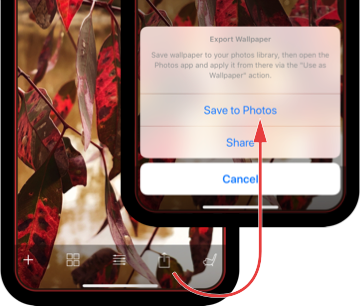
- Apply wallpaper to your home or lock screen from the Photos app, via the "Use as Wallpaper" action
Move and scale as shown in the videos below for iPhone X: